ClearView lighting: charging, light modes and battery life
Published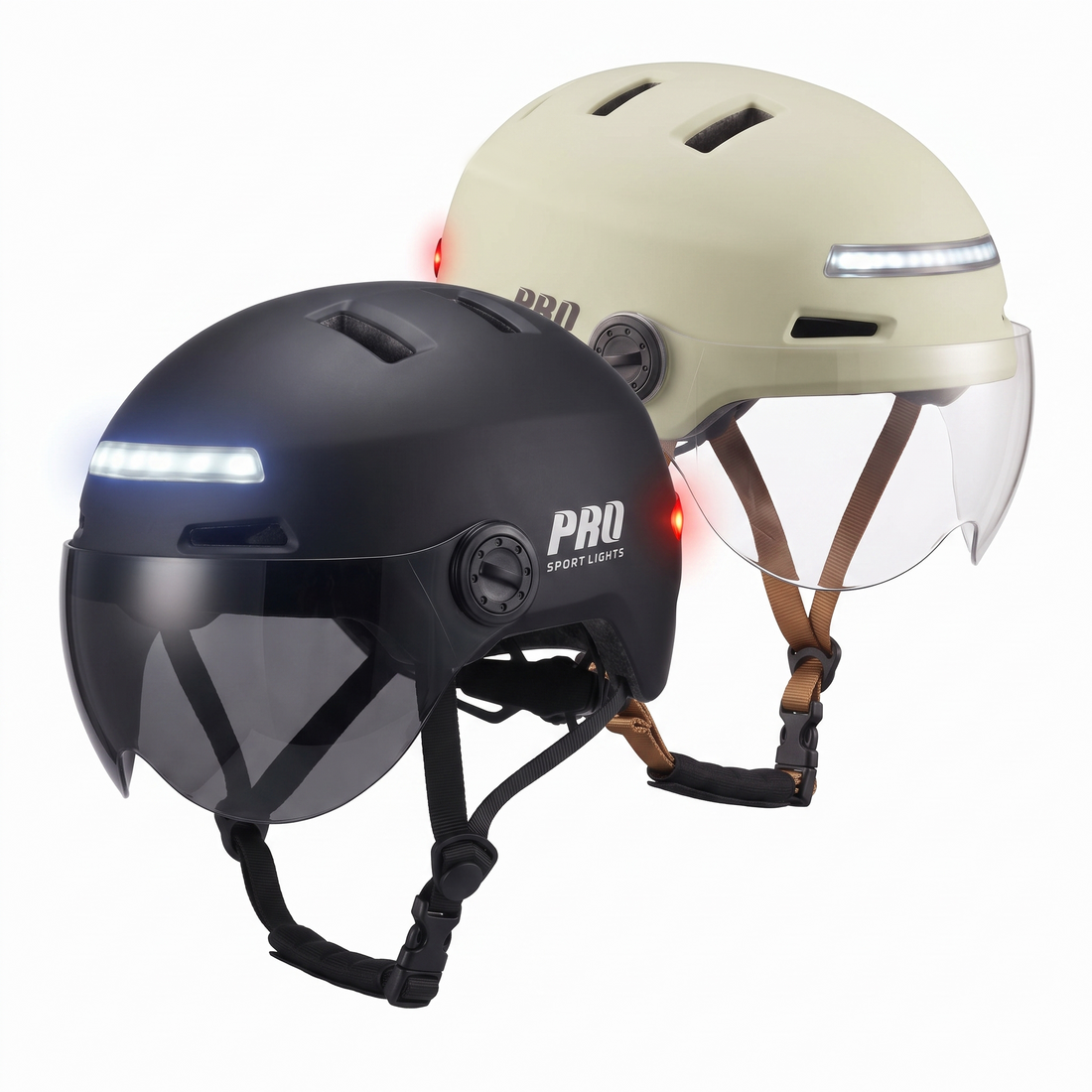
How do you charge the lights on the ClearView bicycle helmet? You charge the built-in lights via USB-C. The specified charging time is approximately 2.5 hours. ClearView has a white LED at the front with a steady light; at the rear, you can choose between steady light, fade, slow flashing and fast flashing. The specified battery life is up to approximately 12 hours, depending on the selected light mode.
Lighting is an important part of the Pro Sport Lights ClearView. It is built into the front and rear of the helmet, so you do not need to fit a separate helmet light. A regular charging and checking routine is still sensible. This guide explains what the specified figures mean, which modes are available and what to check before every ride.

ClearView lighting and battery life at a glance
| Front light | White LED with steady light |
|---|---|
| Rear light | Red LED |
| Rear modes | Steady, fade, slow flashing and fast flashing |
| Charging port | USB-C |
| Specified charging time | Approximately 2.5 hours |
| Specified battery life | Up to approximately 12 hours, depending on the light mode |
“Up to approximately 12 hours” is a maximum product specification, not a guarantee for every ride. The selected light mode affects operating time. Allow a sufficient margin and check the lights before you set off.
How do you charge the ClearView bicycle helmet?
- Place the helmet somewhere dry and stable. First check that the port and charging cable have no visible damage.
- Connect the USB-C charging cable carefully. Do not force the plug if it does not fit easily.
- Allow approximately 2.5 hours. This is ClearView’s specified charging time. Schedule charging well before your next ride.
- Disconnect the cable when charging is complete. For the charging indicator and controls, follow the manual supplied with your helmet.
- Test both lights. Check the white LED at the front and the red LED at the rear separately before putting on the helmet.
Only use equipment in good condition and follow the supplied instructions. Is the port damaged, does the helmet become unusually warm, or do the lights fail to respond as expected? Stop charging and contact us at info@prosportlights.com.
Which light modes does ClearView have?
White light at the front
According to the current product information, the white LED at the front provides a steady light. This makes your head an additional visible point from the front. We position this helmet lighting as supplementary visibility: continue to use suitable bicycle lights and check the rules that apply where you ride.
Red light at the rear
ClearView has four modes at the rear:
- Steady: the red light remains continuously on.
- Fade: the brightness changes gradually.
- Slow flashing: a slow flashing pattern.
- Fast flashing: a faster flashing pattern.
Choose the mode you want to use before setting off and check that the rear light responds. Avoid changing settings unnecessarily while riding. The operating sequence is in the supplied manual; we do not invent a fixed button sequence when it may differ by version or instructions.
A practical charging and checking routine
A regular routine is the simplest way to avoid setting off with an empty helmet-light battery. Adapt it to the length and frequency of your rides.
- Before every ride: test the front and rear lights and check that the visor is correctly fitted.
- After several rides: recharge in good time, rather than discovering an empty battery while out riding.
- Before a longer ride: preferably set off with a fully charged helmet and take the maximum specified operating time into account.
- After a wet ride: let the outside of the helmet dry before using the USB-C port.
- For cold commutes: also check the fit if you have installed the optional Winter Kit.
Do you use ClearView to commute every day? Our e-bike commuting guide helps you establish a routine for charging, choosing a visor and winter comfort.
Checking the lights without forgetting the fit
Built-in lighting is convenient, but a helmet must first fit correctly. ClearView is available in Medium for a head circumference of 50–57 cm and Large for 54–61 cm. In the overlapping range, the actual fit determines which size sits correctly.
Measure your head circumference and use our size chart and fitting guide. Do you wear glasses? Also check that your frames remain clear when the visor is lowered. The separate fit check for glasses wearers explains this step by step.
Who is ClearView with built-in lighting suitable for?
ClearView is a logical choice if you are looking for a helmet with a specified weight of approximately 445 grams including the visor, would like both a clear and a dark visor included as standard, and want built-in LED lighting at both the front and rear. The lights are already built into the helmet and charge via USB-C.
ClearView is less suitable if you expect the helmet lights to replace your regular bicycle lights completely, or if you need a guaranteed, fixed battery life in every light mode. The specified maximum operating time depends on the mode. For a complete overview of sizes, visors and accessories, also see the general ClearView buying guide.
Frequently asked questions about ClearView lighting
How long do ClearView’s lights last?
The specified battery life is up to approximately 12 hours, depending on the light mode used. Treat this as a maximum product specification and allow sufficient charging reserve.
How long does charging take?
The specified charging time is approximately 2.5 hours via USB-C.
Which modes does the rear light have?
The red rear light has four modes: steady, fade, slow flashing and fast flashing. ClearView has a white LED at the front with a steady light.
Does the helmet lighting replace my bicycle lights?
No. Use the helmet’s LED lighting for supplementary visibility, and also equip your bicycle with suitable lights.
Are the visors included?
Yes. ClearView comes with a clear visor and a dark sun visor. Choose the visor that provides sufficient vision in the current light conditions.
View ClearView with LED lighting
Start by choosing the right size and colour. You receive the ClearView helmet with built-in lighting, a clear visor and a dark sun visor.
View ClearView and choose your size →
Need help? Email your head circumference and question to info@prosportlights.com.
By Pro Sport Lights. Product information checked on 19 October 2026. The linked product page shows the current specifications, versions, prices and availability.